What's new, and the first three steps
snyvi had 29 releases this October. Each one updated itself quietly, said "Updated to 1.48", and pointed at a list of pull requests on GitHub. That list tells you what I merged. It doesn't tell you what you can now do.
Save as PDF, for one, has sat at the top of every page since 1.48, and nothing in the app ever said so. A feature you don't know about might as well not be there.
A page that says what changed
Now, after an update, snyvi files a page called What's new in snyvi, the same way an agent's plan or report lands. It lists everything since the version you had, newest first. Skip three updates and you get all three. Each thing gets a sentence in plain words, a picture where one helps, and a Show me → link.
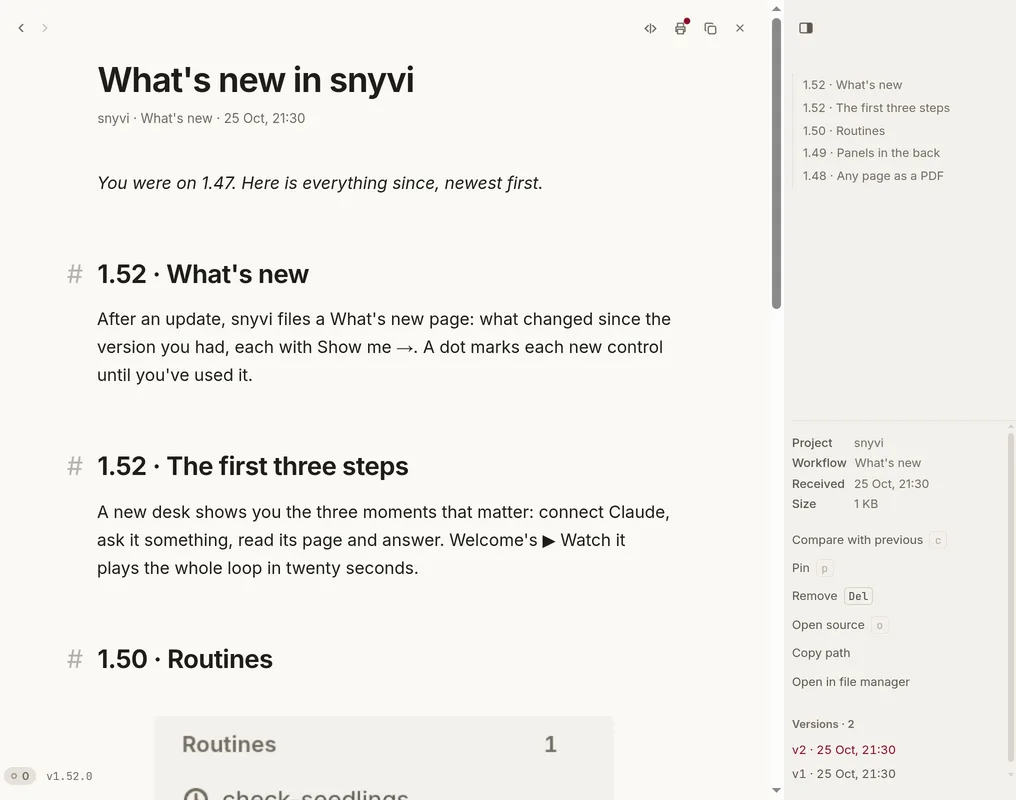
The page is a document like any other, so it's searchable and it stays. The next update doesn't add a second page. It adds a new version of the same one, so the versions of that page are the releases.
A toast in the corner says how many things are new, for example "9 new things since 1.47", and opens the page.
Show me, and a dot
A sentence about a button doesn't help if you can't find the button. Show me → opens the place it lives, a desk or a page, and draws a ring around it.
For two weeks after an update, a small dot sits on each new control, such as + In the back…, the note field, or Save as PDF. Its tip says when it arrived and what it's called. Press the control once and the dot is gone. Only a few show at a time, so the window doesn't turn into a checklist.
Claude hears it too
The Claude in a panel is told about the update for a week, in one line: what changed, and that the page has it. It's told to mention a new thing only when that helps the work in front of you. The instructions snyvi gives Claude are also brought up to date when a new version starts. Before, an update could leave them a few versions behind.
The first three steps
New people have a sharper version of the same problem: everything is new. A tour that points at twelve things in a row teaches none of them. So on your first desk, snyvi points at three moments, one at a time, when you get to each:
- Connect. The desk starts Claude in the project's folder.
- Ask Claude. One button asks where the project stands, and Claude reads the folder and its history.
- Read its page and answer. What Claude writes for you lands as a page on the desk. Read it, and answer in the panel.
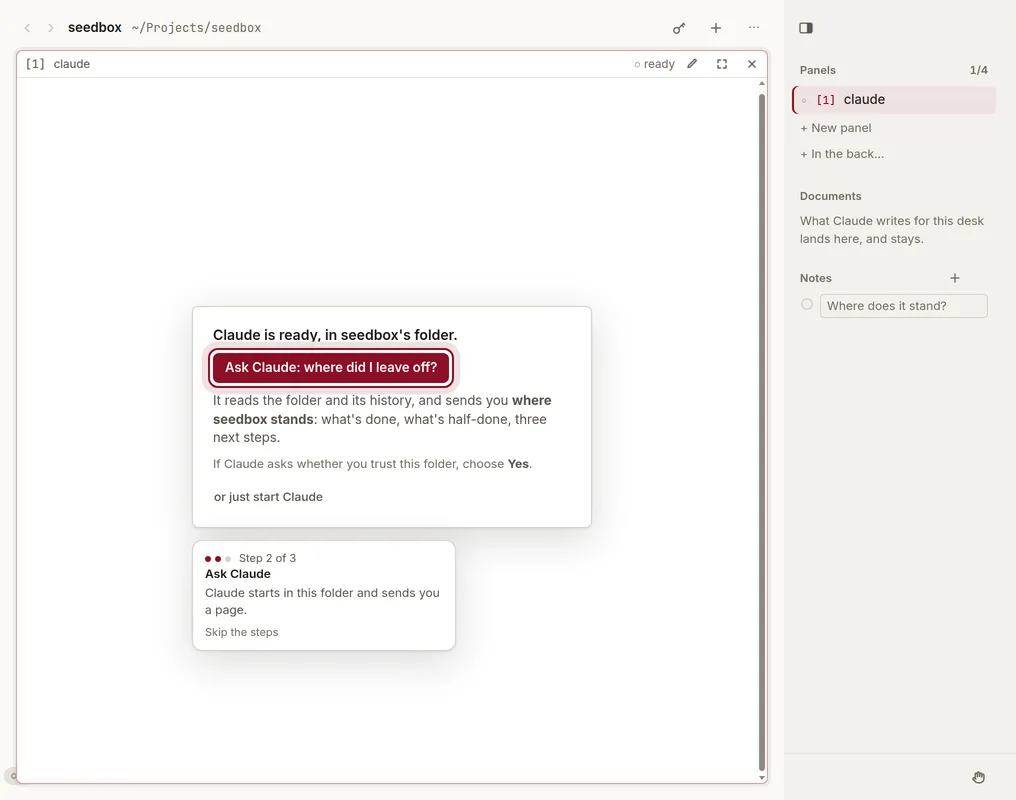
The steps end when Claude gets back to work after your answer. That's the loop snyvi is built around: an agent works, you read what it wrote, you say what's next. Once you've done it once, there's nothing left to point at.
If you'd rather see it before you try it, the Welcome screen has ▶ Watch it, the whole loop in twenty seconds.
One list behind all of it
The page, the dots, the line Claude hears and the notes on each GitHub release all come from one file in the repository, where each new thing gets a few lines: when it shipped, what it's called, one or two sentences, and where it lives. The words you read in the app are the words on the release page. A fix gets no entry. If it doesn't change what you can do, it isn't news.
Also in this update
1.52 carries 1.51 with it. If you were on 1.50, your What's new page has these too:
- Save a picture, a film or a song from the media bar, or from over any picture in a page.
- Back to the panel that sent it. A page's ✕ names the panel that sent the page, and takes you there.
- Diagrams you can read. None opens too small. A long flow is drawn top-down, and Turn puts it back.
- ⌘K finds files by name in your desks' folders. Start with
f:for files alone.
Try it
snyvi is free, runs on your machine, and has no account. It's here for Linux, macOS and Windows, and the source is on GitHub. If you already have it, it updates itself, and the page will be waiting.