Routines you try once, then start
Some work comes back. Every morning, read what came in overnight and write the digest. Every Monday, check the links in the posts. Every first of the month, sort the reading list. You end up asking Claude for the same thing on the same day each time.
A routine is that request, written once. snyvi starts it at the hour you pick, in a panel in the back of the project's desk. What it writes lands on the desk like any other page, and anything it needs from you waits on your On you list.
A field of its own
Each desk has a Routines section under Notes, with a field. Type / and snyvi lists the commands and skills Claude Code would find in this project and in your own setup, each with what it's for and where it comes from.
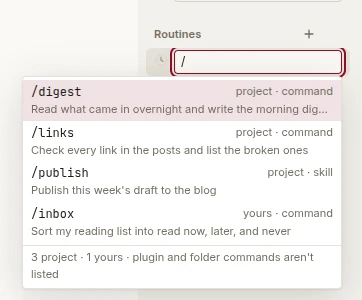
/ list on a blog's desk: the project's two commands and its skill, then a command of your own.Then say when: every day 7:30, every weekday 9, every mon, every 1st. A line under the field says what snyvi read, for example "every day 07:30 · project command · first tomorrow 7:30", before you press Enter.
It doesn't have to be a command. Write your own words, such as tidy the drafts folder · every fri 17, and that's what Claude is asked.
A command is resolved the way Claude Code resolves it. A skill beats a command of the same name, and yours beat the project's. Where the docs leave the order open (your command and the project's skill sharing a name), snyvi says so and doesn't guess.
First it's a draft
Enter doesn't start anything. It makes a draft and opens its sheet, where everything a routine depends on is in one place:
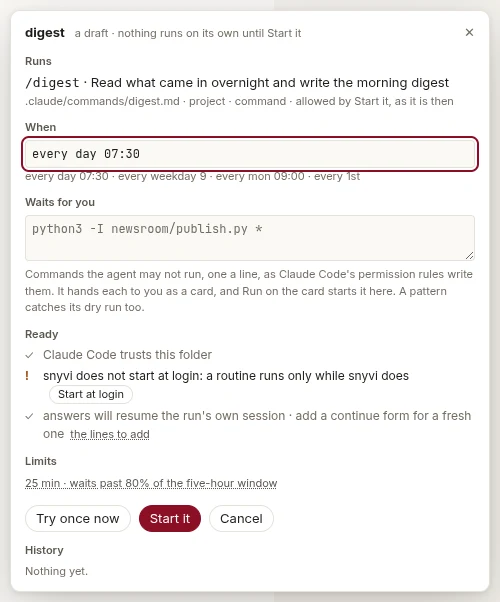
- Runs names the file. The routine runs that file as it is when you start it.
- Waits for you lists the commands the agent may not run on its own: a publish, a deploy, anything that spends a key. They're written as Claude Code's permission rules are. When a run gets to one, it hands it to you as a card, and Run on the card starts it.
- Ready checks what would make an early-morning run fail: that Claude Code trusts the folder, that snyvi starts when you log in (a routine runs only while snyvi does), and how your answers will get back to it.
- Limits keep a run short, and hold it back when your usage is near its limit.
Try it once, then start it
Try once now runs it straight away, in a panel in the back, while you watch. If the command asks you something, the question comes to On you, and your answer goes back to it. Once it does what you meant, Start it, and it comes back at its hour from then on.
Answers keep working when you're away. If the command has a form for being continued, the next session starts fresh with your answer, as /digest continue: …. Otherwise snyvi resumes the run's own session, so Claude remembers what it asked.
It stays the routine you started
A routine runs the file you started. If someone changes that file, an agent or a pull, the routine waits, and its sheet shows what changed, with Allow to run the new version.
Pause holds a routine, answers and all. Remove takes it out of view, and like everything in snyvi it can be brought back.
When you ask Claude in a panel for something to happen on its own, it can write the command and offer it as a routine. The offer opens as a sheet, and you try it and start it the same way. Nothing an agent offers runs until you do.
Also in this update
- Copy keeps the Markdown. Copy part of a page and paste it into Claude, a terminal or GitHub, with its bullets, headings, tables and code intact. Hover a heading for a mark that copies its whole section.
- A note that landed waits for you. When the commit that finishes a note reaches main, the note asks you to check it, and only you can tick it. Your tick keeps the commit.
- Cards leave when they're done. Tell Claude in the chat that you added the key or ran the build, and it takes the card off On you, saying why. A card it asks again in other words replaces the old one.
- Download says so. Downloading a page now answers beside its ↓.
Try it
snyvi is free, runs on your machine, and has no account. It's here for Linux, macOS and Windows, and the source is on GitHub. If you already have it, it updates itself, and its What's new page will show you Routines and Copy.