Everything that's on you, in one list
With a few projects going, the things only you can do end up in different places. A card Claude left on one desk until you sign in. A line you dated for today on another. What last night's routine wrote for you. A session that stopped with "if this looks right, ship it". Each was in snyvi, each in its own place, and you had to go and look.
In 1.54 they're one list. It's called On you, and it's in the corner of every page and at the top of Home.
One list, in the order you'd do it
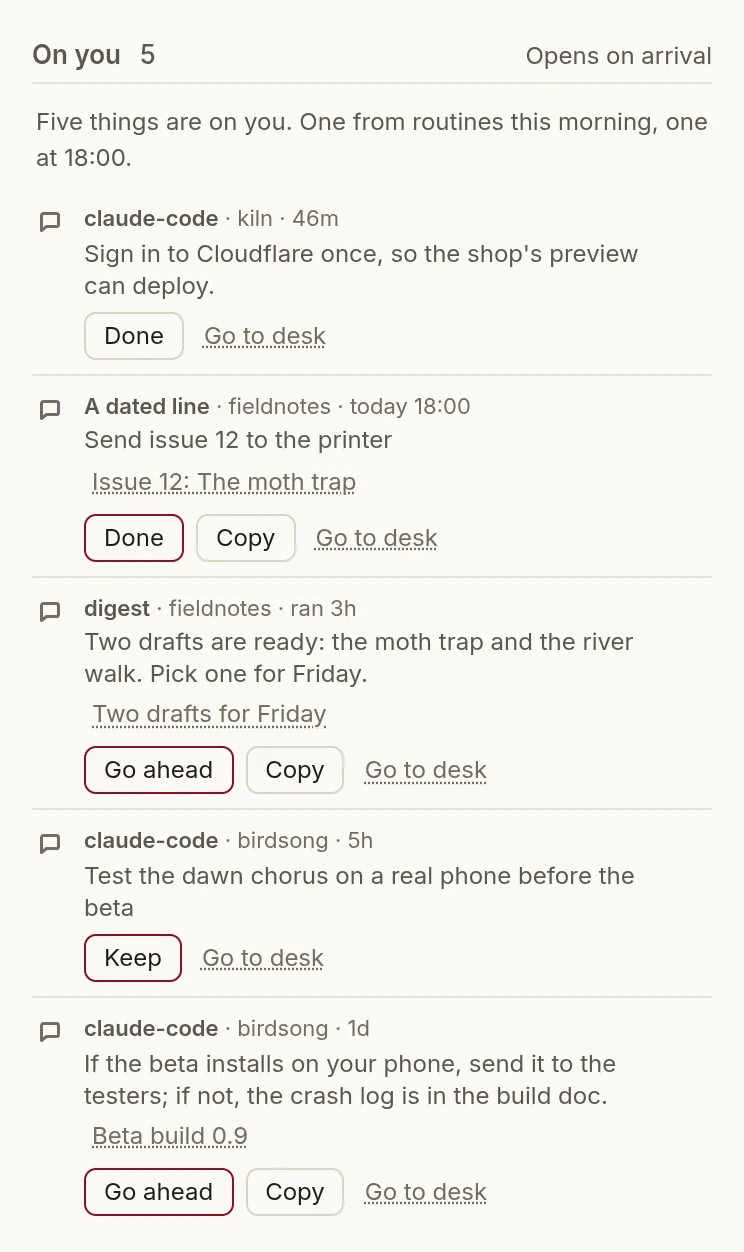
First comes what's blocking someone: a card an agent can't get past until you sign in, add a key or decide. Then a line you dated, due today. Then what a routine left for you this morning. Then a plan to approve, or a line Claude suggested you keep. Last, a session that stopped and is waiting on your word, once it has waited a day.
Each row says which desk it's on and comes with the document it's about, so you can read it before you answer. The button beside it is the one step it needs: Done, Go ahead, Approve or Keep. The corner shows the first seven and says how many more there are, and on which desks. Home shows them all, grouped by desk once they span more than four.
It opens when you arrive
The first time you bring snyvi to the front each day, On you opens by itself, with one sentence on top: "Five things are on you. One from routines this morning, one at 18:00." After a few days away, it says that first. If more has become yours since, it opens again later in the day.
If you'd rather open it yourself, turn off Opens on arrival at the top of Home's box.
Answer it where it is
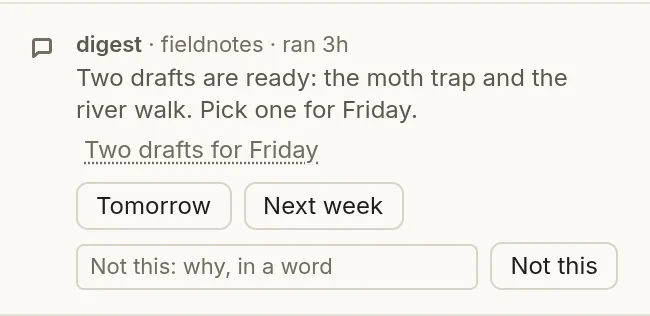
Not everything on the list is for today. The ✕ on a row asks when. Tomorrow brings it back at nine the next morning, and Next week on Monday at nine. Not this, with a word about why, takes it off the list, and for the next week Claude reads your word when it starts on that desk, so it doesn't ask again. Undo stays in the row while you change your mind.
Go ahead is for a line that waits on your word. On a routine's line, the routine carries on in its panel in the back without you opening it, and anything on its Waits for you list still comes to you first. On a session's line, Go ahead is your approval, and its panel hears it next.
Also in this update
- A line carries its document. Paste a document's link after a note and the note keeps it: its row in On you opens it, and Copy copies it. Claude can attach one when it suggests a line.
- HTML pages fill the screen. An HTML document has Full screen beside Width and Copy, or press f. Esc gives you the column back.
- A routine says how late it ran. If the laptop slept through a routine's hour, it runs when the laptop wakes, and its row and its history say how late. Time asleep doesn't count against its minutes.
- The window keeps your bars. On Linux, a window saved at a screen's full size came back as full screen, over the top bar and the dock. It now comes back maximized, with both in view.
Try it
snyvi is free, runs on your machine, and has no account. It's here for Linux, macOS and Windows, and the source is on GitHub. If you already have it, it updates itself, and its What's new page will show you On you.